The bathroom fan is suddenly much louder and repair services are closed for New Year. What can I check myself?
Introduction
There’s nothing quite like starting a quiet morning only to be startled by a loud, rattling bathroom fan. You flip the switch expecting a gentle hum, and instead the room fills with a sharp, unfamiliar noise. It’s distracting, unsettling, and immediately makes you wonder whether something is wrong behind the ceiling.
Moments like this tend to happen at the worst possible times. Holidays, weekends, early mornings—when repair services are closed and professional help isn’t an option. A noisy bathroom fan can feel like a problem you’re stuck living with, especially when you’re not sure whether it’s harmless or a sign of something that needs attention.
The good news is that many fan noise issues are caused by simple, fixable problems. With a calm approach and a few basic checks, you can often identify the source of the noise and restore some peace to your space—without tools, stress, or unsafe guesswork.
Start With Safety First (Always)
Before checking anything, turn off the power to the fan. Don’t rely on the wall switch alone—use the circuit breaker that controls the bathroom. If you’re unsure which breaker it is, turning off power to the entire bathroom is the safest option.
Once the power is off, gather a few basics:
- A screwdriver
- A flashlight
- A sturdy step stool or ladder
Optional but helpful: safety glasses and a dust mask if the fan hasn’t been cleaned in a while.
Listen Carefully: The Sound Tells a Story
Different sounds often point to different issues.
- Rattling or vibrating: Usually loose screws, a shaky cover, or light debris
- Humming: The motor may be working harder than it should
- Grinding: Often caused by friction or parts touching where they shouldn’t
Taking a moment to identify the type of noise helps you know where to focus next.
Quick Visual Check: Cover, Grille, and Screws
Remove the fan cover or grille and inspect it closely. Loose screws are a very common reason bathroom fans suddenly get loud.
- Tighten any screws you see
- Make sure the cover sits evenly against the ceiling
- Check for cracks or warping that could cause vibration
Even a slightly loose grille can amplify sound dramatically.
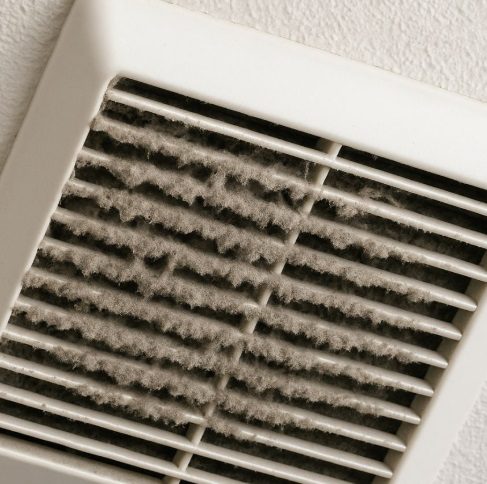
Dust Buildup: The Most Common Culprit
Bathroom fans quietly collect dust over time. When buildup gets heavy, it throws off airflow and causes extra noise.
Use:
- A vacuum with a brush attachment
- Or compressed air
Clean both the inside and outside of the cover. This simple step alone often reduces noise immediately and improves airflow.
Clean the Fan Blades (Gently)
With the cover removed, you’ll be able to see the fan blades.
- Wipe them carefully with a soft cloth or small brush
- Avoid bending the blades
- Remove visible dust and debris
If the blades are heavily coated, the fan may work harder than necessary, creating extra sound.
Check for Wobble or Imbalance
Gently spin the fan wheel by hand (with power off). It should move smoothly without wobbling.
If it feels uneven:
- Check that the fan is seated correctly
- Tighten any mounting screws
- Make sure nothing is rubbing against the housing
A balanced fan runs quieter and lasts longer.
Look for Obstructions in the Housing
Shine a flashlight into the fan housing and duct opening.
Check for:
- Dust clumps
- Small debris
- Signs of insects or nesting material
Blocked airflow forces the fan to strain, which can increase noise. Clearing light obstructions often restores normal operation.
When It’s Time to Pause and Call a Professional
If the fan still sounds loud after cleaning and tightening, the motor itself may be wearing out. At that point, it’s best to stop troubleshooting and schedule professional service when available.
Persistent grinding, burning smells, or failure to start are signs the fan may need repair or replacement.
Why You’ll Love Addressing This Early
- Quieter mornings and evenings
- Better bathroom ventilation
- Improved fan efficiency
- Less wear on electrical components
- A calmer, more comfortable home
Small fixes now help prevent bigger repairs later.
Helpful Tips to Keep Your Bathroom Fan Quiet
- Clean the fan every 3–6 months
- Always run the fan during showers to reduce moisture buildup
- Avoid slamming doors, which can loosen covers over time
- Replace damaged vent covers promptly
FAQs About Noisy Bathroom Fans
- Is a loud fan always a serious problem?
No—many noise issues are caused by dust or loose parts. - Can cleaning really make a difference?
Yes, it’s often the most effective solution. - Should I oil the fan motor?
Most modern fans are sealed and don’t require oil. - How long do bathroom fans last?
Typically 10–15 years with proper care. - Is it safe to keep using a noisy fan?
If the noise is light and consistent, yes—but investigate the cause. - Can humidity cause fan noise?
Excess moisture can contribute to dust buildup and wear. - Do all fans get louder over time?
Some increase in sound is normal as parts age. - Should I replace the fan instead of repairing it?
If the motor is failing, replacement may be more cost-effective. - Can I upgrade to a quieter model later?
Yes—newer fans are significantly quieter and more efficient. - Is this something I should check regularly?
A quick inspection every few months helps prevent surprises.
Final Thoughts
A noisy bathroom fan can feel disruptive, but it doesn’t have to ruin your day—or your holiday. In many cases, the solution is simple, safe, and well within reach. Taking a few minutes to inspect and clean your fan can restore comfort and confidence in your home.


